
Salesforce Data Backup Strategy
Why native data exports may not be enough to protect your organization’s data—and what to consider when building a more reliable backup strategy.
Data backup & shared responsibility
Salesforce often serves as the operational backbone of an organization. It may hold donor relationships, program participation records, constituent histories, grant information, service delivery data, and the workflows that help teams turn information into impact.
But what happens if important records are accidentally deleted, a data import overwrites the wrong fields, or an integration introduces errors across thousands of records?For many organizations, the first assumption is that Salesforce already has this covered.
Salesforce provides native data export capabilities, and those tools can be a useful part of a data protection strategy. However, having the ability to export data is not the same as having a complete, reliable plan for recovering it.
The question isn’t simply whether you have a backup. It’s whether you can recover the right information, from the right point in time, within a timeframe your organization can manage.
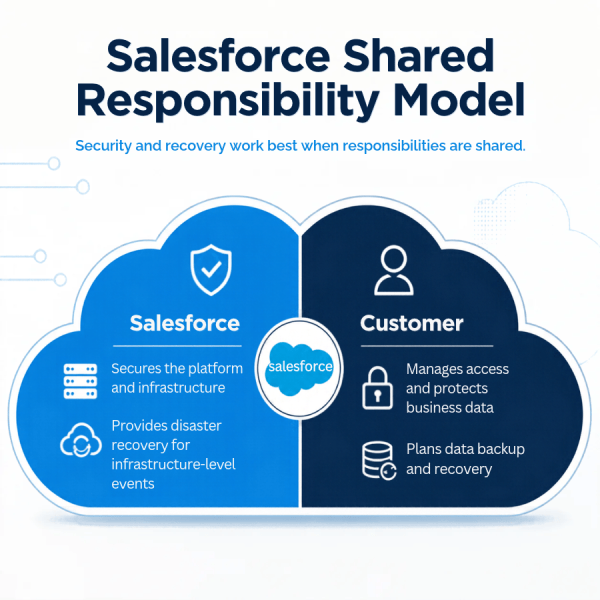
Understanding Salesforce’s shared responsibility model
Salesforce maintains the infrastructure that supports its platform. Customers, however, remain responsible for protecting their own data, managing access, and determining how their information can be recovered.
Salesforce describes this as a shared responsibility model. Its own guidance emphasizes that organizations need a deliberate strategy for protecting their data and configurations, rather than assuming platform availability alone guarantees recoverability.
For impact-driven organizations, the distinction matters. A secure, functioning Salesforce environment can still contain data that has been accidentally deleted, overwritten, or corrupted.
One might assume those mistakes happen because of a security breach. However, they can happen during routine operations: a spreadsheet import, a bulk update, a new automation, or a change to an integration.
The result can be just as disruptive: incomplete constituent histories, inaccurate reports, interrupted program operations, or hours of staff time spent trying to reconstruct information.
Four risks of relying on native data exports alone
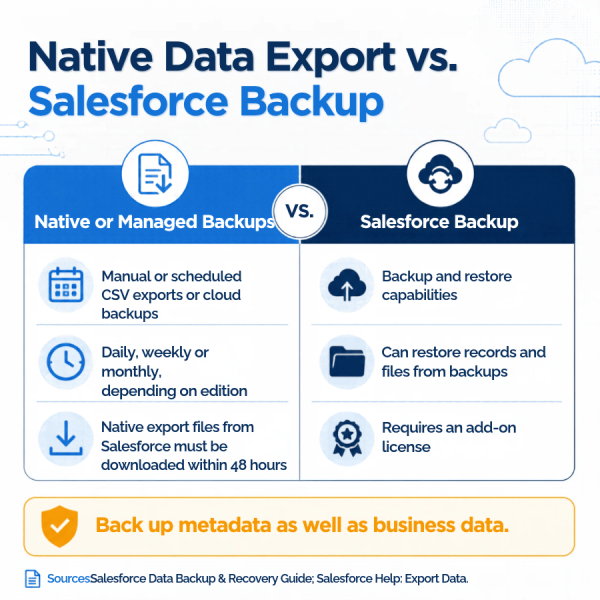
Salesforce’s native Data Export Service can generate downloadable files of an organization’s data on a weekly or monthly schedule, depending on its edition. It is a useful tool—but there are important limitations to understand before relying on it as your primary recovery strategy.
1. Your most recent backup may not be recent enough
The risk: data loss between exports.
Native Data Export runs on a weekly or monthly schedule, depending on the Salesforce edition. That means an export may not reflect the most recent state of your data when a problem occurs.
Imagine your team imports several thousand records on Thursday, but the latest available export is from the previous week. If that import overwrites existing information, the export may not contain the most recent correct values.
The potential impact goes beyond the records changed in the import. Related updates, new relationships, and subsequent activity may also need to be considered during recovery.
What to consider: How much data could your organization afford to lose between backups? If the answer is very little, a weekly or monthly export schedule may not meet your recovery needs.
2. Generating an export doesn’t guarantee you’ll have a usable backup
The risk: files are not downloaded, stored, or maintained properly.
A scheduled export still requires a process for retrieving and securely storing the resulting files. Salesforce states that export files are available for a limited period. This is generally 48 hours after the completion notification, excluding weekends—and can be difficult or impossible to retrieve once removed.
Exports may also take longer than expected to complete, and Salesforce does not provide a service-level agreement for export completion.
In practice, this creates several opportunities for gaps: an email goes unnoticed, the person responsible is unavailable, a download is missed, or the files are saved somewhere they cannot be accessed when needed.
What to consider: Who owns the export process? Who verifies that each backup completed successfully? Where are the files stored, who can access them, and how long are they retained?
A backup process is only useful if the files are available when your organization needs them.
3. Restoring data can be more complicated than exporting it
The risk: having the data doesn’t mean you can easily put it back.
Native exports produce files that may need to be reviewed, mapped, and imported back into Salesforce. Reconstructing a previous state can require technical expertise, especially when records are connected through relationships, automations, or integrations.
Restoring a large set of records is not necessarily as simple as uploading a spreadsheet. Your team may need to identify which records were affected, determine which values should be restored, preserve relationships between records, and avoid overwriting legitimate updates made after the export.
For example, restoring a donor record without accounting for related giving records or subsequent changes could create additional cleanup work instead of resolving the original issue.
Salesforce’s architecture guidance distinguishes native exports from dedicated backup and recovery tools that can support more granular, point-in-time recovery.
What to consider: If a significant data issue occurred tomorrow, would your team know how to identify the affected records and restore them safely? How long would recovery take, and what other business processes could be disrupted in the meantime?
4. A data export may not protect everything you need to recover
The risk: important information or system configuration may be missing from your backup plan.
Salesforce data is more than a collection of individual records. Organizations may also depend on files and attachments, relationships between records, custom fields, automation, and other configuration elements that determine how the system works.
Native exports have specific inclusion settings and limitations. For example, Salesforce documents that formula and roll-up summary fields are excluded from Data Export files, while files and attachments require the relevant export options to be selected.
Data and metadata—the configuration that defines how your Salesforce environment operates—also require different backup considerations. A data export alone should not be assumed to provide a complete, restorable copy of your entire Salesforce environment.
What to consider: Does your backup strategy account for the data, files, relationships, and configuration your organization relies on? Have you confirmed exactly what your current solution includes and excludes?
The operational cost of a backup gap
The consequences of incomplete backups are not limited to data recovery.
When something goes wrong, your team may need to spend time investigating the issue, identifying affected records, rebuilding lost information, correcting reports, and communicating with the people who depend on that data.
For a nonprofit or public-service organization, this can mean less time supporting constituents, serving program participants, or maintaining donor relationships.
It can also create unexpected technical costs. Recovery work may require specialized support, and the longer an issue remains unresolved, the greater its potential effect on day-to-day operations.
No backup solution eliminates every risk. But a deliberate strategy can reduce the likelihood that a routine mistake becomes a prolonged operational problem.
What a stronger Salesforce backup strategy looks like
The right approach depends on your organization’s data, risk tolerance, technical resources, and recovery requirements. For many organizations, it starts with a few practical steps.
- Establish clear ownership.
Determine who is responsible for backups, monitoring, retention, and recovery. Make sure the responsibility is explicit rather than dependent on one person remembering to download files.
- Match backup frequency to business risk.
Consider how frequently your data changes and how much information you could afford to lose. Organizations that rely on Salesforce throughout the day may need more frequent backups than a periodic export can provide.
- Evaluate a dedicated third-party backup solution.
Purpose-built backup tools may offer capabilities such as automated backups, longer retention, granular recovery, and more streamlined restoration workflows. Features vary by provider and plan, so evaluate them against your organization’s requirements rather than assuming every solution offers the same protection.
- Protect the backups themselves.
Backup files should be stored securely, with appropriate access controls and retention policies. CISA recommends maintaining protected backups and regularly testing their availability and integrity as part of recovery planning.
- Test your recovery process.
A successful backup is only part of the equation. Your organization should understand how restoration works, who can perform it, and how to validate that recovered data is accurate and complete.
- Build backup checks into significant data work.
Before major imports, updates, migrations, or other potentially disruptive changes, confirm that an appropriate backup exists. Sandbox testing, mapping validation, small test loads, and log reviews can further reduce risk—but they do not replace a reliable backup.
Three approaches to consider
There isn’t one backup arrangement that fits every organization. The important thing is to make an informed decision and document who owns the responsibility.
✅ Dedicated Backup Service (Recommended)
Setup and ownership: Third-party backup provider
A dedicated backup solution provides automated, ongoing protection for Salesforce data, with recovery capabilities that can help restore data following accidental deletions, unwanted changes, or other data-loss events. Features such as backup frequency, retention, and recovery options vary by provider and plan.
Best for: Organizations seeking a more comprehensive, automated approach to backup and recovery with less manual oversight.
🤪 Self-Managed Backups
Setup and ownership: Internal IT or Salesforce Admin team
Your internal team is responsible for running backups, securely storing exported data, maintaining backup schedules, and understanding how to retrieve or restore information when needed. This approach requires clear ownership and a documented process to ensure backups are available when needed.
Best for: Organizations with the internal resources and technical expertise to manage their own backup and recovery processes.
👩✈️ Partner-Managed Backups
Setup and ownership: Your Partner (or Client Cloudcare)
Your partner or Client Cloudcare can perform a monthly Salesforce data export as billable support work, providing a periodic copy of your data without requiring your team to run the export themselves. This option is a manual, point-in-time export rather than a dedicated backup and recovery solution.
Salesforce’s native data export tool requires someone to retrieve and securely store the files, and restoring data can be more complicated if a significant issue occurs. If you choose this option, we estimate approximately 30–60 minutes of billable support time per month, with exports prioritized at the beginning of each month.
Best for: Organizations that want assistance with periodic data exports and understand the limitations of this approach.
A few questions worth asking today
You don’t need to be a Salesforce administrator to start evaluating your backup readiness. Begin with these questions:
- Do we currently have a backup solution, and who manages it?
- How frequently is our data backed up?
- Where are backups stored, and how long are they retained?
- What data, files, and metadata are included?
- If records were accidentally deleted or overwritten, how would we restore them?
- Have we tested that recovery process?
- Would our current approach meet our needs if we had to recover from a significant data issue tomorrow?
If you don’t know the answers yet, think of that as a useful starting point and a next step.
Protecting the systems behind your mission
Salesforce helps organizations build relationships, coordinate services, and make informed decisions. Protecting the information behind that work is part of keeping those operations dependable.
Native export tools can play a role in a backup strategy, but they shouldn’t be mistaken for a complete recovery plan without evaluating their limitations.
At Client Cloudcare, we encourage organizations to understand their current coverage, clarify who is responsible for maintaining it, and choose an approach that fits their operational needs and risk tolerance.
Learn more about our Salesforce Consulting and Managed Services.
The best time to understand your backup strategy is before you need it.
If you’re unsure what backup coverage your organization currently has, start by confirming what’s in place. From there, you can identify any gaps and decide what additional protection makes sense for your team.
Next Steps & Call to Action
Don’t wait for a data loss incident to test your backup capabilities. Contact the Client Cloudcare team today to review your current Salesforce setup, identify coverage gaps, and implement an automated backup solution tailored to your organization’s needs.
Sources for further reading:
- Salesforce Help: Export Backup Data from Salesforce — Official documentation on export frequency, file availability, download procedures, and export limitations.
- Salesforce Help: Data Export FAQ — Supports the points about delays, lack of an export completion SLA, omitted formula and roll-up fields, and files that are no longer retrievable.
- Salesforce Architects: Reliability — Guidance on backing up both data and metadata and when dedicated recovery capabilities may be needed.
- Salesforce Trailhead: Get Started with Backup & Recover — Explains the shared responsibility model and the risks of accidental data loss.
- CISA: #StopRansomware Guide — Government guidance supporting secure backup storage and regular testing of recovery procedures.